NB NOTE below script has been deprecated – refer to VPS 9 Speedtest for updated command lines.
So tonight performed an Internet Speed Test on VPS 27. Basically it consisted of installing the OOKLA Speedtest on my VPS – a very easy and effortless test to set up. Looks pretty impressive. Faster than 99% of Germany.
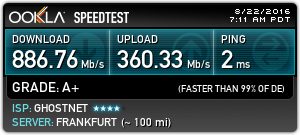
Step 1: Install Speedtest Cli
wget https://raw.github.com/sivel/speedtest-cli/master/speedtest_cli.py
Step 2: CHMOD
chmoda+rx speedtest_cli.py
Step 3: Move file to appropriate location
mvspeedtest_cli.py /usr/local/bin/speedtest-cli
Step 4: CHOWN the script to user and group root
chownroot:root /usr/local/bin/speedtest-cli
Step 5: Perform speed test
speedtest-cli
Step 6: Perform speed test for URL for shared test image
speedtest-cli --share